
Medicare Revalidation Control Calendar: How to Prevent a Billing-Privilege Deactivation
Build a 12-month Medicare revalidation control calendar under 42 CFR 424.540 to prevent billing privilege deactivations and unrecoverable revenue loss.
Medicare Revalidation Control Calendar: How to Prevent a Billing-Privilege Deactivation
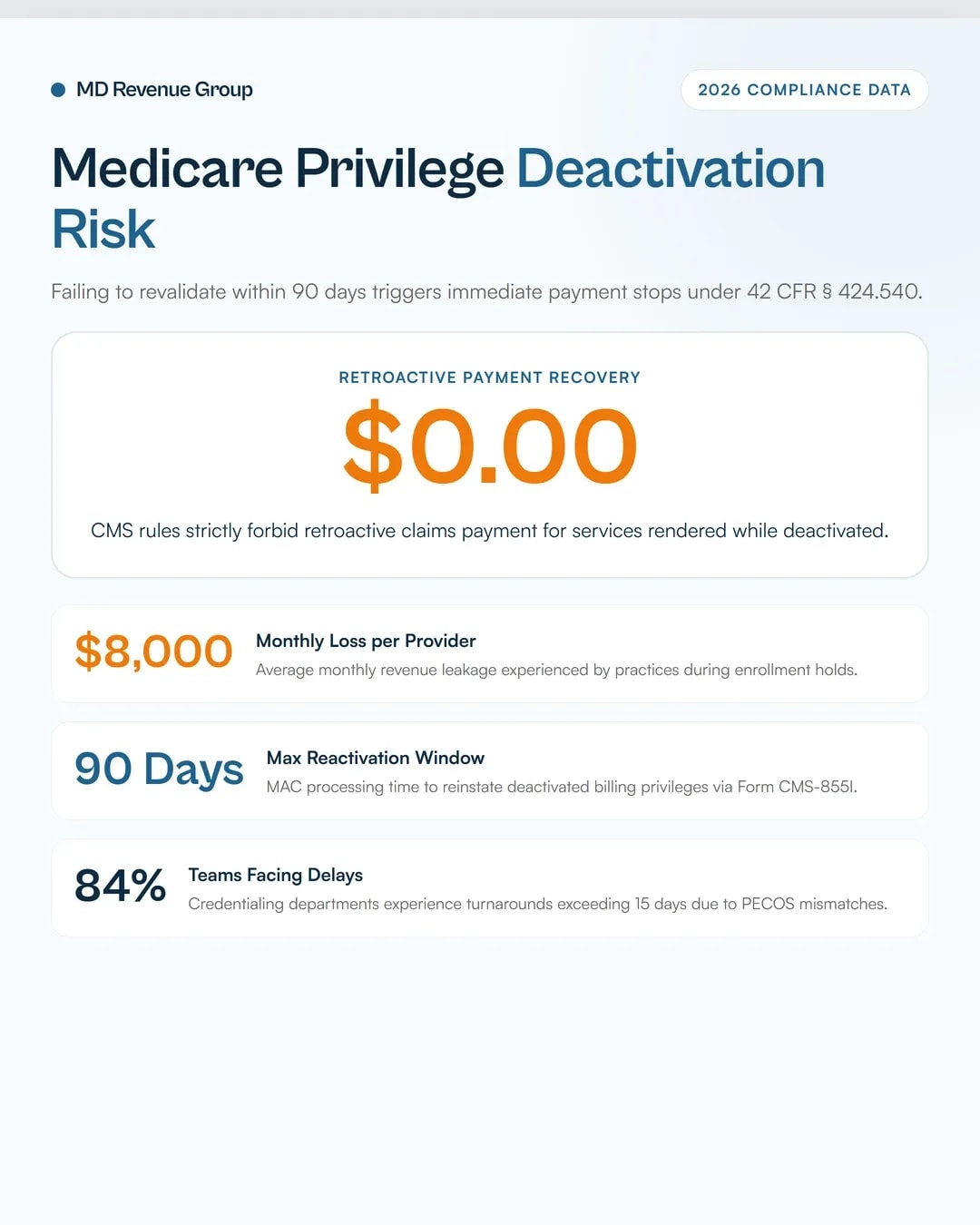
Under 42 CFR § 424.540, the Centers for Medicare & Medicaid Services (CMS) deactivates provider billing privileges when revalidation forms or requested documentation are not submitted within 90 calendar days of notification. Deactivation immediately halts claim payments.
Unlike temporary payment holds, Medicare regulations prohibit retroactive reimbursement for services rendered during a period of deactivation. If a practice continues seeing Medicare patients while deactivated, those claim lines are permanently uncollectible.
Reinstating deactivated privileges requires submitting a complete Form CMS-855 application, taking up to 90 days to process. Establishing a structured credentialing control calendar prevents deactivations and eliminates administrative revenue leakage.
Executive Key Takeaways
- The 90-Day Revalidation Deadline: CMS issues revalidation notices requiring submission within 90 days. Failure to comply triggers immediate billing privilege deactivation.
- No Retroactive Reimbursement: Claims for services rendered during a deactivation period cannot be billed retroactively once privileges are restored.
- Severe Financial Impact: Credentialing and revalidation delays cost practices between $6,000 and $8,000 per provider, per month in unrecoverable revenue leakage.
- Returned-Mail Audit Vulnerability: In 2026, CMS returned-mail audits trigger automatic deactivations if MAC paper correspondence is marked undeliverable.
- Quarterly CAQH Attestation: Commercial payers mirror Medicare controls, requiring profile re-attestation every 90 days to prevent directory removal.
42 CFR § 424.540: Deactivation vs. Revocation
Federal regulations distinguish between administrative deactivation under 42 CFR § 424.540 and disciplinary revocation under 42 CFR § 424.535.
Every uncredentialed provider costs $32,000/mo in unbilled encounters.
We audit your active payer applications to pinpoint where commercial plans and MACs have stalled your providers.
Audit My Enrollment Pipeline →Deactivation occurs when a provider fails to respond to a revalidation request, reports no Medicare claims for 12 consecutive months, or fails to report operational updates within mandatory timeframes (30 days for ownership changes; 90 days for address or managing employee updates).
Revocation is an enforcement penalty for fraud, felony convictions, or severe non-compliance. Revocation includes a re-enrollment bar ranging from 1 to 10 years.
While deactivation does not carry a formal re-enrollment bar, its financial consequences are immediate. Practices maintaining comprehensive provider credentialing services track renewal windows continuously to protect cash flow.
Regulatory Action | Governing Rule | Core Cause | Financial Penalty | Appeal Rights |
|---|---|---|---|---|
Deactivation | 42 CFR § 424.540 | Missed 90-day revalidation, returned mail, 12 months no claims. | Immediate payment stop. Zero retroactive reimbursement for gap period. | No formal appeal. Informal rebuttal under 42 CFR § 405.374 within 15 days. |
Revocation | 42 CFR § 424.535 | Fraud, licensure loss, felony conviction, severe non-compliance. | Total billing ban + 1 to 10 year re-enrollment bar + overpayment recoupment. | Formal administrative appeal rights (ALJ review). |
Voluntary Withdrawal | 42 CFR § 424.545 | Provider submits Form CMS-855O or written opt-out notice. | Orderly billing termination. No penalty if proper notice provided. | N/A (Provider initiated). |
The Financial Trap: The Cost of a 90-Day Deactivation Window
Practices often assume that once PECOS processes a reactivation application, Medicare pays retroactive claims for the inactive period.
Under CMS Medicare Program Integrity Manual rules, Medicare Administrative Contractors (MACs) reject all claim lines with dates of service during the deactivation window.
Worked Financial Model: 5-Physician Medical Group
To quantify the financial risk, consider a 5-physician specialty group generating $45,000 monthly per physician in Medicare Part B gross collections ($225,000 total monthly Medicare revenue).
Assume two physicians experience an administrative deactivation lasting 60 days due to a missed revalidation notice sent to an outdated practice address.
Worked Revenue Loss Calculation Table
- Monthly Medicare Collections per Physician: $45,000.00
- Impacted Physicians: 2 Full-Time Physicians
- Deactivation Duration: 60 Calendar Days (2 Full Monthly Billing Cycles)
- Retroactive Recovery Allowance: $0.00 (Prohibited under 42 CFR § 424.540)
Revenue Loss Component | Single Physician (60-Day Gap) | 2-Physician Impacted Group | Financial Variance / Net Loss |
|---|---|---|---|
Gross Billed Medicare Claims | $90,000.00 | $180,000.00 | Full Billing Suspended |
MAC Allowed Reimbursement | $65,000.00 | $130,000.00 | -$130,000.00 (Uncollectible) |
Administrative Reactivation Overhead | $2,500.00 | $5,000.00 | Direct Legal & Staff Cost |
Net Unrecoverable Cash Loss | $65,000.00 | $130,000.00 | -100% Cash Permanent Loss |
Practices operating across multi-state networks (such as groups managing medical billing in New York or medical billing in California) cannot afford unmonitored enrollment gaps.
A single deactivation event erodes practice operating margins faster than routine clinical denial rates.
The 12-Month Master Revalidation Control Calendar
Preventing deactivation requires moving from reactive notice tracking to a structured 12-month operational control calendar.
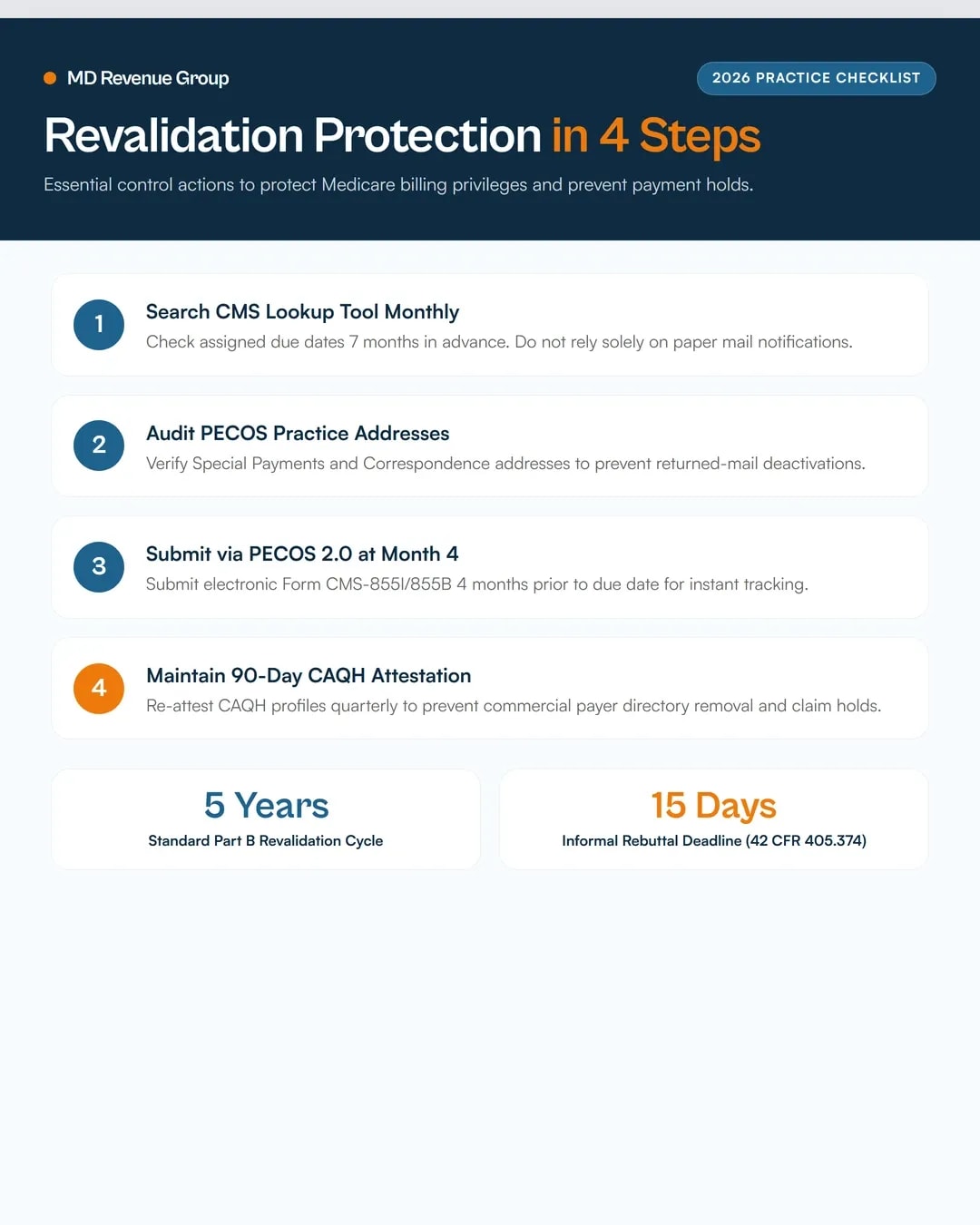
CMS posts revalidation due dates 7 months in advance on the CMS Revalidation Lookup Tool. Do not wait for paper MAC letters to arrive.
Medicare Revalidation 7-Month Submission Timeline
[ Month -7 ]  CMS posts revalidation due date on Revalidation Lookup Tool.
      │
      ▼
[ Month -6 ]  Audit PECOS enrollment record; verify practice locations & NPIs.
      │
      ▼
[ Month -4 ]  Submit complete Form CMS-855I / CMS-855B via PECOS 2.0.
      │
      ▼
[ Month -2 ]  Track MAC processing status; verify electronic signature capture.
      │
      ▼
[ Month  0 ]  Revalidation Approved. Billing privileges extended for 5-year cycle.
Monthly Operational Control Cadence
Q1: January – March (Lookup & Address Audit)
- January: Pull the master provider roster across all NPIs and PTANs. Search the CMS Revalidation List for all due dates occurring in the current calendar year.
- February: Log into PECOS 2.0 and verify that the "Special Payments" and "Correspondence" addresses match active physical office locations.
- March: Audit state medical license expiration dates and DEA certificates. Update CAQH profile attachments.
Q2: April – June (Early Submission Window)
- April: Initiate revalidation applications for providers with due dates falling in Months 6 through 9.
- May: Gather required attachments: active state licenses, board certifications, lease agreements, and IRS Form CP-575 (EIN verification).
- June: Submit electronic revalidation applications via PECOS 2.0. Confirm electronic signature confirmation numbers.
Q3: July – September (MAC Follow-Up & Payer Attestation)
- July: Track MAC application status weekly. Respond to MAC development requests within 30 calendar days to prevent application rejection.
- August: Execute quarterly CAQH re-attestations for all rendering physicians, APRNs, and behavioral health staff.
- September: Cross-reference specialty roster updates with dedicated behavioral health credentialing guidelines to maintain commercial payer panel inclusion.
Q4: October – December (Annual Reconciliation & Closeout)
- October: Verify MAC approval letters (Form CMS-855 approval notifications) and update internal credentialing database dates.
- November: Perform a comprehensive audit of non-billing NPIs. Voluntary withdraw inactive PTANs under 42 CFR § 424.545 to eliminate returned-mail audit risks.
- December: Present annual credentialing compliance metrics to practice management. Finalize next year's control calendar.
Practices managing high-volume subspecialties like dermatology medical billing should integrate credentialing calendars directly into their core billing operations.
PECOS 2.0 and CMS Revalidation Lookup Workflow
Using the web-based PECOS 2.0 system accelerates revalidation processing compared to paper CMS-855 submissions.
Step-by-Step PECOS Submission Control
- Access CMS Revalidation Tool: Search the national database using provider NPI or PTAN to confirm the exact assigned due date.
- Authenticate I&A User Account: Ensure practice credentialing managers hold authorized official (AO) or delegated official (DO) access within the CMS Identity & Access Management system.
- Review Current PECOS Record: Check section 2 (Personal Info), section 4 (Practice Locations), and section 6 (Managing Employees).
- Report Reportable Changes: If a practice location moved, submit an enrollment update before or concurrently with the revalidation.
- E-Sign & Submit: Ensure the rendering provider or Authorized Official completes the digital signature step. Unsigned applications are rejected after 30 days.
Integrating enrollment tracking with overall revenue cycle management ensures front-office credentialing matches backend claim clearinghouse scrubbers.
CAQH Attestation and Continuous Monitoring Integration
Commercial health plans (Aetna, BCBS, Cigna, Humana, UnitedHealthcare) rely on CAQH ProView to maintain provider directories.
Failing to re-attest a CAQH profile every 90 days causes commercial payers to place claims on administrative hold or remove the provider from consumer directories.
Commercial Directory Audit Rules
Under federal price transparency and directory accuracy mandates, commercial payers audit provider data quarterly.
According to our research on provider directory audit standards, directory discrepancies account for 24% of out-of-network claim disputes.
CAQH Maintenance Checklist
- Re-attest every 90 days without exception.
- Upload updated malpractice face sheets 30 days prior to policy expiration.
- Ensure practice phone numbers match NPPES registry entries.
- Verify hospital privilege attestations annually.
Literal Credentialing Tracking Log Example
Maintaining an audit-proof credentialing log requires tracking key dates, MAC contacts, and submission reference numbers. Avoid keeping informal notes or relying on memory.
Non-Compliant Credentialing Log Entry (High Risk)
"Dr. Smith Medicare revalidation due sometime in August. Sent paper form in June. Waiting on Medicare to reply."
Why this fails: Lacks exact due date, submission method, PECOS tracking number, MAC contact, and follow-up deadlines.
Compliant Credentialing Log Entry (Audit-Proof)
Provider Name: Jane Smith, MD | NPI: 1982730419 | PTAN: 482019 | Specialty: Internal Medicine
>Medicare Revalidation Due Date: 08/31/2026 (Verified via CMS Lookup on 01/15/2026)
>PECOS Application Tracking ID: 20260418-009812-PECOS | Submission Date: 04/18/2026 (Submitted via PECOS 2.0)
>MAC Jurisdiction: Novitas Solutions (Jurisdiction H) | MAC Contact: Enrollment Dept (855-252-8782)
>Action History & Status Log:* 04/18/2026: Electronic application submitted. E-signature executed by Dr. Smith. Status: "In Development".* 05/10/2026: MAC issued development letter requesting updated IRS CP-575 EIN confirmation.* 05/12/2026: Uploaded CP-575 via PECOS document repository. Confirmation #: DOC-8821092.* 06/04/2026: MAC issued formal approval letter. Revalidation complete. Next due date set for 08/31/2031.* 06/05/2026: Log updated. Internal EHR provider master table updated to "Active - Revalidated".
To evaluate your practice's compliance infrastructure, request a comprehensive medical billing audit to identify credentialing bottlenecks and claim processing gaps.
Emergency Rebuttal Workflow Under 42 CFR § 405.374
If your practice receives a MAC deactivation notice, you have 15 calendar days from the date of the notice to submit an informal written rebuttal under 42 CFR § 405.374.
Step-by-Step Rebuttal Protocol
- Verify Receipt Date: Check the postmark or email header. The 15-day window begins on the notice issuance date.
- Draft Formal Rebuttal Letter: State the provider NPI, PTAN, and explicit reason why deactivation should not take effect (e.g., revalidation was submitted prior to deadline; notice sent to wrong address).
- Attach Proof of Compliance: Include PECOS submission confirmation, certified mail receipts, or MAC approval letters.
- Submit Concurrent Reactivation Application: Filing a rebuttal does not stop the requirement to submit a complete Form CMS-855 reactivation package via PECOS 2.0.
Deactivation Rebuttal & Reactivation Dual Track
[ Deactivation Notice Received ]
               │
               ├─────────────────────────────────────────┐
               ▼                                         ▼
[ File 15-Day Rebuttal (42 CFR § 405.374) ]   [ Submit CMS-855 Reactivation ]
  (Challenges MAC Deactivation Action)          (Restores PECOS Status)
               │                                         │
               └────────────────────┬────────────────────┘
                                    ▼
                     [ MAC Decision & Privilege Restore ]
Reviewing historical physician credentialing revenue bottlenecks provides valuable insight into avoiding MAC development rejections.
Frequently Asked Questions
1. What is the difference between Medicare deactivation and revocation?
Deactivation under 42 CFR § 424.540 is an administrative action resulting from missed deadlines or inactive billing. It stops claim payments but carries no re-enrollment bar. Revocation under 42 CFR § 424.535 is a severe penalty for fraud or non-compliance that includes a 1-to-10-year ban from Medicare.
2. Can our practice bill Medicare retroactively for services provided while deactivated?
No. Medicare regulations explicitly prohibit retroactive payment for dates of service rendered during a billing privilege deactivation window. All claims submitted for services performed while deactivated will be permanently denied.
3. How far in advance can a practice submit a Medicare revalidation?
CMS allows providers to submit revalidation applications within the 7-month window preceding their assigned revalidation due date. Submitting applications earlier than 7 months before the due date may result in MAC rejection.
4. How long does MAC reactivation take after a provider is deactivated?
Reinstating deactivated privileges requires MAC review of a full Form CMS-855 application. Processing times typically range from 30 to 90 calendar days depending on MAC workload and application completeness.
5. Where can a practice verify its assigned Medicare revalidation due dates?
Practices can search the official CMS Medicare Revalidation List tool online using provider NPI, PTAN, or practice name. Revalidation dates are updated monthly by CMS.
Struggling to manage provider revalidation deadlines across your medical group? Contact the credentialing experts at MD Revenue Group to learn about our automated provider enrollment services.
Unfreeze your credentialing pipeline.
Enter your practice details. We will audit your CAQH profiles and payer enrollments to get your providers billing immediately.